Your photos, organized on a map
Upload, geotag, and process your photos by location. Edit EXIF metadata, stamp coordinates, and export — all from your browser.
Start for free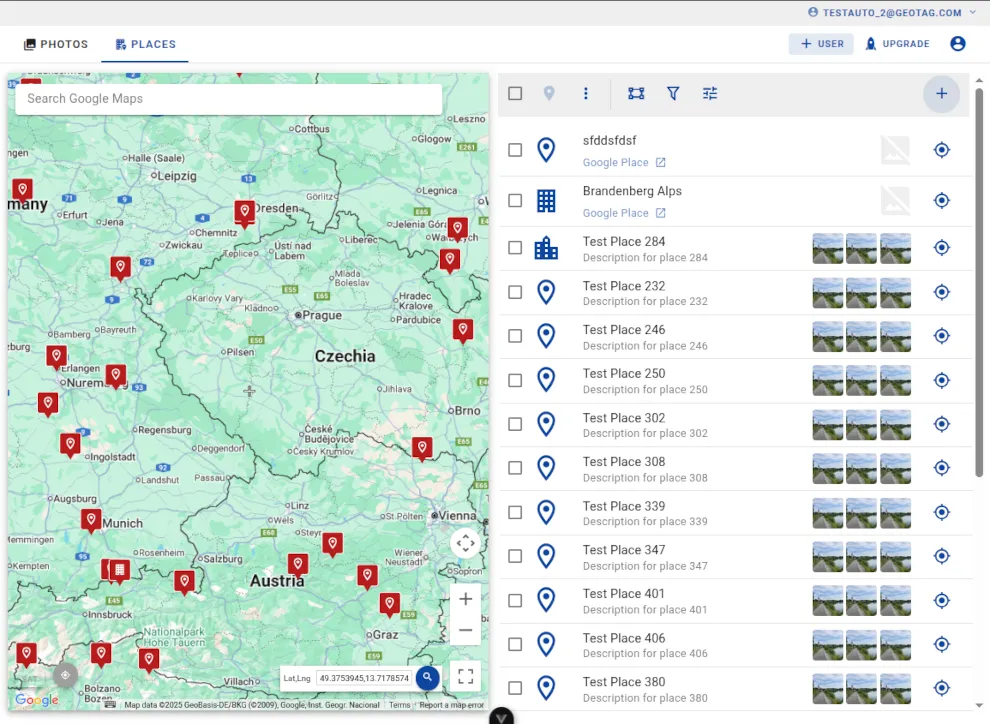
How Geotag.com works
Five steps from upload to publish. Organize your entire photo library by location in minutes.


Organize by place
Create places on the map, assign photos to them, and browse everything geographically. Add tags, descriptions, and custom icons to keep things organized.

Edit GPS & metadata
Set or correct GPS coordinates by clicking the map, typing coordinates, or using your device location. Write metadata directly into your photo files.

Process & stamp
Convert formats, resize, and stamp visible GPS coordinates and timestamps onto your photos. Process one image or hundreds in a single batch operation.

Export & publish
Download processed photos as ZIP archives, export places to KMZ for Google Earth, or publish directly to Google Business Profile.
Built for teams that work with locations
From solo travelers to enterprise field teams
Travelers & Photographers
Organize travel photos on a map. Geotag images, add location descriptions, and export albums by destination.
Real Estate & Inspections
Document properties with GPS-stamped photos. Batch process inspection images and export organized reports.
SEO & Marketing Agencies
Manage location photos for dozens of business listings. Publish directly to Google Business Profile in batch.
Enterprise & Field Teams
Coordinate photo collection across teams with role-based permissions. 100 GB per user, audit trails, and admin controls.

Photo Stamping
Stamp GPS coordinates, date, time, and custom descriptions directly onto your photos. Make location data visible and searchable while maintaining image quality and professional presentation.

Batch Processing
Edit in batch mode: edit, geotag, write EXIF, convert, stamp, and download many photos at once. Process hundreds of images simultaneously with consistent settings and professional results.

Effective Team Collaboration
Invite team members with five permission levels — from read-only to full admin. Control who can view, upload, edit, or manage your content. Filter by contributor to review each team member's work.

Robust Data Security
All data hosted on Google Cloud with HTTPS encryption. Photos served through signed, time-limited URLs. Role-based access control ensures team members only see what they should. Your originals are stored securely and never shared.
Ready to organize your photos?
Start for free with 100 places and 100 photos. Upgrade when you need more storage, team features, or EXIF editing.